
Ps2 64bit Plugins arm64
Elegator Dev Inc.Libraries & Demo
3.961.00 Reviews
- Version
- 229
- Installs
- 1.00M
- Age Rating
- Everyone
Screenshots
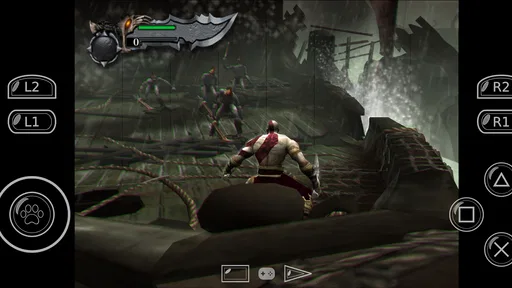
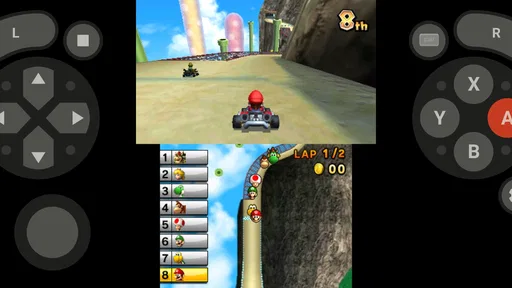
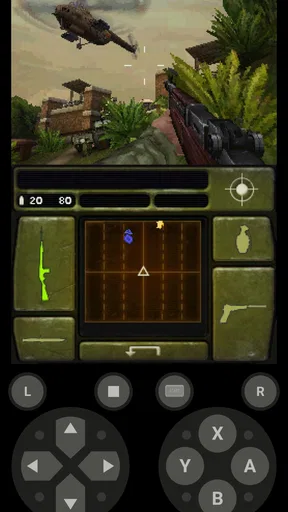
Our Review of Ps2 64bit Plugins arm64
 Analysis by Appyee
I tend to think about PS2 emulation as a shared living-room hobby rather than a solo project: one person remembers a game, someone else wants to see what it was like, and a phone or tablet becomes the device everyone gathers around. Ps2 64bit Plugins arm64 is aimed at a narrower part of that experience than its name might suggest. It is an app in the Libraries & Demo category from Elegator Dev Inc., focused on plugins for 64-bit ARM devices. Its appeal depends less on nostalgia alone and more on whether you already use a compatible PS2 emulator and are comfortable managing its components.
That distinction matters in a household. This is not a PS2 game collection or a complete emulator, so I would not install it expecting a ready-to-play library. Think of it as a possible supporting piece in an existing setup. The app is free and rated for Everyone, but that age label does not make emulator configuration effortless or guarantee that every game, device, or family member’s setup will behave the same way. I’d treat it as a technical utility to explore together, not as a plug-and-play family game app.
Where it fits in a shared setup
In a realistic evening scenario, I might use a shared Android device to check whether a PS2 emulator can make use of ARM64 plugins, then let another person try a familiar title after I have finished adjusting the setup. The useful part is having a component intended for that architecture in the same device environment. The less convenient part is that the plugin itself is only one link in a chain: the emulator, its own settings, the device, and the game all affect the result.
For that reason, I would make one change at a time rather than switch several graphics or performance options before testing. If a game looks better but becomes unstable, a single change is easier to undo and compare. That small habit is especially helpful when more than one person uses the device, because it prevents a shared setup from turning into a mystery collection of settings no one remembers changing.
Setup boundaries before anyone plays
Before installing, I’d check that the device runs Android and uses a 64-bit ARM architecture, then confirm that the emulator I plan to use can work with external plugins. The app’s current version is 229, and its stated minimum operating-system requirement is Android 8.0. Those details help narrow down compatibility, but they are not a promise that every device or emulator combination will work smoothly.
I would also keep the emulator’s own configuration separate from the plugin download in my mind. If the emulator does not recognize a plugin, that does not automatically mean the game or device is at fault; it may be a compatibility or setup issue between the two pieces. For a shared phone or tablet, I’d note the original settings before experimenting and avoid changing a configuration someone else relies on without asking. That is a practical household boundary, not a special feature of this app.
Compared with choosing a different emulator, a plugin-focused app is a narrower option: it may help someone who already has a working emulator and wants to explore ARM64 support, but it is not a substitute for selecting and configuring the emulator itself. If you are starting from scratch and want one straightforward place to launch games, investigating an emulator first is usually the better route. If you already have one and know why you need a plugin, this app is more relevant.
What’s the Buzz About?
So, what exactly is Ps2 64bit Plugins arm64? Well, it’s a nifty app designed to enhance the performance of your PS2 emulator on ARM64 devices, particularly those running Android. It promises to optimize graphics, improve compatibility, and give you a smoother gaming experience. Sounds pretty sweet, right?
Getting Started
First things first, installing the app was a breeze. You just download it from the provided link, and you’re good to go. Now, I’m not the most tech-savvy person out there, but the setup was straightforward. The app walks you through the process, making it feel like a piece of cake.
Once you have it up and running, you’ll notice that the user interface is clean and intuitive. It doesn’t bombard you with unnecessary options, which is a relief. Instead, it focuses on the essentials, allowing you to tweak settings to your liking without feeling overwhelmed.
Diving into the Features
The real magic of Ps2 64bit Plugins arm64 lies in its features. It offers a range of plugins tailored for ARM64 architecture. This means that if you've got a compatible device, you’ll be able to push your emulator to new heights.
- Graphics Optimization: One of the standout features is its ability to enhance graphics. The improvement in visual quality is noticeable, and it really does make those old games pop.
- Improved Compatibility: The app works hard to ensure that a wider range of PS2 titles run smoothly. I tested a few games, and the performance was impressive. No more annoying glitches or crashes!
- Customizable Settings: You get a decent array of settings to fiddle with. Whether you want to adjust the resolution or frame rate, it’s all there for you.
Making changes without disrupting everyone
Those options are most useful when I treat them as experiments rather than universal fixes. A graphics adjustment that suits one game may not be the right choice for another, and a device that handles one title well may struggle with a different one. I’d test the game that matters to the household, keep notes on the setting that helped, and avoid assuming that a result will carry over to every title.
When several people share the device, coordination can be simple: agree on who is testing, let them change one setting, and restore the previous state if the next person prefers it. This app does not replace the need for that conversation. Nor would I assume that every user has a separate configuration or account boundary available; those depend on the device and emulator arrangements, not on the plugin app itself.
There is also a trade-off between visual polish and dependable play. If a familiar game becomes less responsive after increasing visual settings, I would favor steady controls over a sharper image. For someone showing a game to a younger player, a predictable session is often more valuable than squeezing out every possible visual adjustment. If the setup becomes frustrating, returning to the emulator’s known configuration is a sensible stopping point rather than a reason to keep changing options.
Performance in Action
I spent a good chunk of my weekend reliving some classic PS2 games, and let me tell you, it was a trip down memory lane. The performance boost was evident from the get-go. Games that used to lag or stutter ran smoothly, and the improved graphics made everything look sharper.
The app also seemed to handle more demanding titles with ease. I was particularly impressed with how it managed to maintain stable frame rates, even during intense gaming sessions. It’s like these plugins gave my emulator a shot of adrenaline!
Who will get the most from it
I can see this being useful for someone who already understands the basics of PS2 emulation, owns a compatible Android device, and wants to try plugins designed for 64-bit ARM hardware. It may also suit a curious household where one person is happy to manage setup while others simply want to play after the technical work is done. In that situation, the person configuring the device can test changes before handing it over, reducing interruptions during a shared session.
I would skip it if what you want is a collection of games, a complete emulator, or a guaranteed fix for every performance problem. It is also a poor match if you are not interested in checking architecture and emulator compatibility. The app has an average rating of 3.8 from around five thousand ratings, with about fifty-five written reviews, and has passed one million installs. Those figures suggest a meaningful audience, but they cannot tell me whether it will fit a particular device or solve an individual game’s issue.
For readers weighing alternatives, the choice is between adding a focused plugin utility to a setup you already have and spending time finding an emulator whose built-in options meet your needs. The first path makes sense when you know what component you want to test. The second is often less confusing for a new user, because fewer separate pieces need to be coordinated. Neither route removes the need to check device compatibility, and neither guarantees identical results across PS2 games.
Age, trust, and realistic expectations
The Everyone content rating makes the app suitable for a broad audience from a content-rating perspective, but I would still supervise setup when a child is using a shared device. The main concern here is less about the app’s category and more about keeping emulator settings and household device use understandable. I’d explain that the app helps configure part of an emulation setup; it is not itself a game library, and installing it does not make every PS2 title ready to play.
It is sensible to use games and files that you have the right to use, and to keep any account or device choices consistent with the people who share the hardware. Those are general good practices, not functions I would attribute to this app. Its role is specific: it provides plugins intended for ARM64 architecture. A family looking for parental tools, separate profiles, or a managed game catalogue should look to the relevant device or emulator options instead.
One practical question is whether the app can make an incompatible emulator work. I would not count on that: the plugin’s architecture target and the emulator’s ability to use it both matter. Another is whether it is worth trying on a device that already runs games well. If you have no specific problem to address, changing a stable setup may add complexity without a clear benefit. I’d reserve experimentation for a game or configuration where the potential improvement is worth the time.
Another common concern is whether “free” means there is no setup cost in time. The app itself is free, but checking compatibility and testing settings can still take patience. Its release date was June 28, 2022, so I would pay attention to whether the app and the emulator work together on the device I actually plan to use rather than assume age alone tells the whole story. That is a more useful test than expecting a plugin to improve performance automatically.
Final Thoughts
All in all, Ps2 64bit Plugins arm64 is a fantastic addition to any retro gamer’s toolkit. It does exactly what it promises, breathing new life into your PS2 emulation experience. Whether you’re a casual gamer or a hardcore enthusiast, it’s worth checking out.
At the end of the day, anything that helps us relive those cherished gaming moments is a win in my book. So, go ahead and give it a whirl. Who knows? You might just find yourself lost in a PS2 marathon before you know it!
My household verdict
My recommendation is conditional rather than automatic. If one person in the home is comfortable managing an Android emulator and wants to explore plugins for 64-bit ARM, this app is a reasonable component to investigate. I would set it up before a planned shared session, test the specific game, and leave the device in a configuration everyone can use. That approach keeps the fun part—playing—separate from troubleshooting.
If the household wants instant access to games, a simple console-like experience, or built-in family coordination, I’d choose a different starting point and look for a complete emulator or another platform that better matches those needs. For the right user, though, this is a focused utility rather than an all-in-one solution. Knowing that boundary is what makes it easier to decide whether it belongs on your device.
Privacy and Permissions
See what permissions an app requests and how it handles your data.
- Other
- control vibration
Verdict
Strengths of Ps2 64bit Plugins arm64
- Supports a wide range of PS2 games.
- Smooth graphics rendering on modern devices.
- Customizable control settings.
- Regular updates with new features.
- Minimal lag for an immersive experience.
Limitations of Ps2 64bit Plugins arm64
- Not compatible with older devices.
- Some games may have minor glitches.
- Requires BIOS, which isn't included.
- High battery consumption during use.
- Limited support for third-party plugins.
Similar Picks in This Category
View All
PGT: GFX, Launcher & Optimizer
Trilokia Inc.4.5

AusweisApp Bund
Governikus Service GmbH3.7

Cardboard
Google LLC3.2

Gamers GLTool with Game Tuner
Trilokia Inc.4.5

Multi Web Chat - Read Secretly
World Scan & Cleaner3.8

App Cloner Premium & Add-ons
App Listo1.9
Frequently Asked Questions
What is Ps2 64bit Plugins arm64 used for?
Ps2 64bit Plugins arm64 is designed for Android devices with arm64 architecture, allowing users to enhance their PlayStation 2 emulation experience. It provides improved performance and compatibility for gaming enthusiasts who want to enjoy classic PS2 games on modern devices, leveraging the 64-bit processing power.
Is Ps2 64bit Plugins arm64 compatible with all Android devices?
Ps2 64bit Plugins arm64 is specifically compatible with Android devices that support the arm64 architecture. Users should check their device specifications to ensure compatibility. Devices with older architectures or lower specifications may not support the plugins efficiently, leading to suboptimal performance or incompatibility issues.
How do I install Ps2 64bit Plugins arm64 on my device?
To install Ps2 64bit Plugins arm64, download the plugin files from a trusted source and follow the installation instructions provided. Typically, you’ll need to place the plugins in the appropriate folder of your PS2 emulator app. Ensure your emulator is updated to the latest version for optimal performance and compatibility.
Are there any legal concerns with using Ps2 64bit Plugins arm64?
Using Ps2 64bit Plugins arm64 itself is legal, but users must ensure they own legal copies of the PS2 games they wish to play. Emulation is often in a legal gray area, so it is important to adhere to local laws and regulations regarding game emulation and intellectual property rights.
What are the main benefits of using Ps2 64bit Plugins arm64?
The main benefits include enhanced graphics, improved game compatibility, and smoother performance on devices supporting arm64 architecture. These plugins unlock the full potential of modern hardware, allowing users to enjoy a more immersive and fluid gaming experience while playing PlayStation 2 classics on their Android devices.
